



From the manufacturer

|
|
|
|
|---|---|---|
Incredibly Fast 280 Hz Refresh RateAstonishing overclockable 280Hz refresh rate means the display is almost twice as fast as conventional 144 Hz monitors. You’ll experience amazingly-fluid gaming visuals, giving you the upper hand in first-person shooters, racing, real-time strategy and sports titles. |
Fast IPS Display−1ms (GTG) Response TimeFast IPS Display allows the display’s liquid crystal elements to switch up to 4X faster than conventional IPS panels for improved response. With a 1 ms gray-to-gray response time, smearing and motion blur are virtually eliminated. This display also delivers superior images with outstanding colors thanks to 72% NTSC color gamut and an astounding 1,000:1 contrast ratio. Wide 178-degree viewing angles ensure minimal distortion and color shift even when you’re viewing from extreme positions. |
Certified NVIDIA G−SYNC CompatibleWith variable-refresh-rate (VRR) technology enabled by default, you’re assured seamless, tear-free gaming experiences from your NVIDIA GeForce GTX 10 or NVIDIA GeForce RTX 20-series graphics card. |


|
|
|
|
|---|---|---|
Extreme Low Motion Blur (ELMB) SyncWith ELMB SYNC, you can enable ELMB (extreme- low-motion-blur technology) and Adaptive-sync at the same time, eliminating ghosting and tearing for sharp visuals and high frame rates while gaming. |
High Dynamic Range (HDR) with DisplayHDR 400HDR technology delivers a wider color range and higher contrast than traditional monitors. The brightest whites and the darkest blacks bring out details like never before. The display is also capable of 400 cd/m2, meeting the stringent requirements for DisplayHDR 400 certification. |
Multi HDR ModeNow you can choose from multiple HDR modes to adjust monitor HDR performance based on the current viewing scenario. |


|
|
|
|
|---|---|---|
Dynamic Shadow BoostASUS Dynamic Shadow Boost technology automatically clarifies dark areas of the game world with optimizing other areas, improving overall viewing while also making it easier to spot enemies hidden in shaded areas of the map. |
GamePlusThe ASUS-exclusive, integrated GamePlus hotkey offers in-game enhancements that help you get more out of your game. This function is co-developed with input from pro gamers, allowing them to practice and improve their gaming skills. |
GameVisualASUS GameVisual Technology has seven pre-set display modes to optimize visuals for different types of content. This unique feature can be easily accessed through a hotkey or the on-screen display settings menu. |


|
|
|
|
|---|---|---|
Flicker-Free technologyFlicker-Free technology reduces flicker to minimize eyestrain for improved comfort when you’re embroiled in long gaming sessions. |
Ultra-Low Blue Light technologyASUS Ultra-Low Blue Light technology reduces the amount of potentially harmful blue light emitted by the display. Four different filter settings are available to control the amount of blue light reduction. |
Rich connectivityExtensive connectivity options, including DisplayPort1.2, HDMI 2.0×2 and Earphone Jack offer support for wide array of multimedia devices. |




Fox –
I first got the model without height adjust and it was terrible. It was dim and viewing angles were horrible. Returned that and got the model with high adjust and it is great. Super bright and fast. Perfect for CS2.Not sure why the different quality between the two. Maybe the first one was defective.
Amazon Customer –
Was a gift to my son and so far he likes it for gaming and homework etc. Compared to other big brands, the price was great for the speed and whatever else he said he needed in a monitor ;)!
Elijah –
Love this monitor! Actually swapped from 27 inch to a 24 inch feels and looks the same way and this is a cheaper one compared to my other one. 10/10 really awesome monitor
RJ –
Very good! My first gaming monitor!
Stephen ColeStephen Cole –
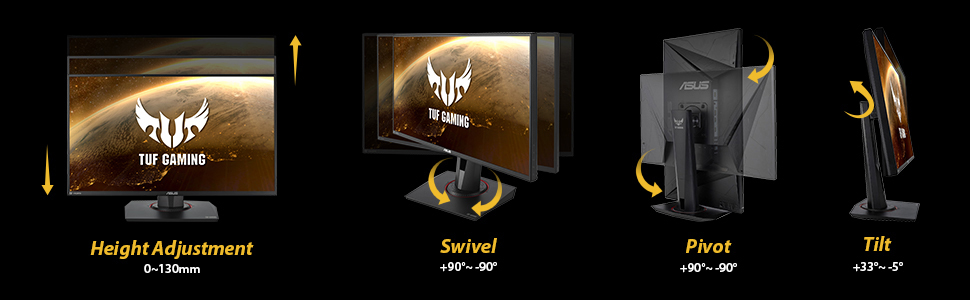
The monitor I picked is the “ASUS TUF Gaming VG279QM 27” HDR Monitor, 1080P Full HD (1920 x 1080), Fast IPS, 280Hz, G-SYNC Compatible, Extreme Low Motion Blur Sync (ELMB SYNC), 1ms, DisplayHDR 400″I only had one problem with this monitor and that was the data cable that comes with the monitor (you get 1 HDMI and 1 Data Cable in box plus power cord). I had to purchase a “Infinnet DisplayPort 1.4 Cable 8K 60Hz, 4K 144Hz, 4K 120Hz, 2K 280Hz 240Hz, 1080p 360Hz DisplayPort to DisplayPort Cable DP 1.4 HBR3 Cord, HDR, VESA Certified, 3 Meters (9.84 ft) Black” (that is on Amazon for $30) and this cable is so much better than the one that comes in the box (because its gold tipped and not silver like the one you get with monitor) and it actualy fits into my graphics card. Plus it makes the images and text crystal clear and not fuzzy than the original cable. It was so nice of Amazon to help pay for the costs for that new cable. Thanks Amazon!! Now to get Gsync ability you must use the data cable, not the HDMI cable. Some people complain that the resolution isn’t good enough, then buy the cable I mentioned. Ever hear of downsampling? Look it up, you can simulate 4k resolution on this monitor (so you get the best of both worlds, better visual and fast hz) and will not hurt it one bit, even though they recommend not doing so, so use at your own discretion but I think its because they want you to purchase the more expensive monitor. Unless you got 32 GB of memory in your rig like I do, then you can do supersampling to boost the visuals and images. I also recommend using at least a MSI Geforce GTX 1080 graphic card for best performance. Now while most software cant go beyond 240 hz yet while this monitor can perform at 280 hz, lets hope the programmers out there can kick it up a notch. Make sure to turn on HD mode in windows when using this monitor even though it will turn off Game Visual in the monitors menu option when you do. Shadow Boost will also be disabled in menu options, not sure why but it doesn’t matter, the monitor is bright enough even at HDR 400. The ability to swivel, tilt, height adjustment on this monitor is amazing, you can even view content with your monitor sidways if you wish. There was no bleeding, dead pixels or damages on the monitor and it was very secure in the box when shipped. I recommend getting Prime when purchasing and you can get it monthly instead of yearly. I received it in just 2 days after purchase.The BEST and FASTEST monitor created!
Adam –
The refresh rate on this monitor with the features and the price point are great. I like player vs player games, so 1080p is perfect for me. The difference between 60hz and 280hz was insane. Granted, you will need a computer/setup that is capable of producing the amount of frames this monitor can display.Setup is easy. Just be careful unpacking as the metal base fell out while I was lifting the monitor out of the box and hit my toe.You can display FPS, crosshairs, and change picture quality very easily with the buttons on the side of the computer. The buttons aren’t confusing like some. The cable included is perfect for this monitor, you will not need a faster transfer speed cable.
alyanna –
super nice monitor for a good price!
Josh –
I’ve had this monitor for a couple of weeks now and so far it’s been great. No dead pixels, no stuck pixels, and no backlight bleed out of the box.Pros — I’d done quite a bit of research before making this purchase and I can tell you it’s definitely worth the sub $300 price. Even at $400+ this monitor would be worth it IMO.- The colors out of the box were great, no complaints there, although I’m no expert when it comes to color accuracy. Absolutely no backlight bleed either, which is common with IPS panels. I may have just gotten lucky in this regard though.. It’s extremely bright as well, in fact I feel running it above 60/70 brightness to be TOO bright.- The stand is good quality, sturdy, and surprisingly versatile. I set it where I want it, and it stays there.- Response time/input lag are LOW! It has one of the best response times/input lag out of all of the newer “fast ips” monitors. It even competes with the response times/input lag of TN panels. At 280Hz and 80 OD, it measures at 1.7ms. I personally prefer 240Hz @ 60 OD, which is what you get out of the box, after setting 240Hz in Windows of course. But if you can consistently hit 280+ FPS in the games you play, I’d recommend 280Hz @ 80 OD.I haven’t used ELMB, so I can’t speak on that regard, but I have heard good things about it. I’ve also read that it can run 240Hz @ 10bit.Cons -The only con I can think of is the joy stick. While it is GREAT and makes navigating the menu extremely easy; it feels a little cheap. I haven’t had any issues with it, but I worry how it may hold up over time.If you’re like me and do a lot of competitive gaming and enjoy a nice picture with no ghosting/blur, I highly recommend this monitor.
Radiator –
– Good color accuracy out of the box. Didn’t have to adjust much other than the obscenely high brightness that every monitor seems to come with nowadays.- ELMB is surprisingly good even though it seems to lock the overdrive. If I had to guess, it would be overdrive 60 since it’s the default setting of the monitor. I had only heard bad things about ELMB from reviews on other models so I was glad to see it’s at least a little bit useful here.- No grainy text or anything of that sort that plagued a couple of 24″ models from the previous year.- Menu is easy to navigate and the OSD joystick is of good quality.- Really good heavy stand that can pivot, tilt, rotate, and height adjust.- The speakers are well, monitor speakers. If you’ve heard monitor speakers, you’ve mostly heard them all. Can’t expect much from 2 watts. The option is there though.Also I’m not sure if this is a feature on every 240hz monitor since this is my first one but I found it interesting that Windows registered the panel as 10 bit color when below 240hz. For the people worried about 60hz performance, sorry. I don’t have any equipment or the knowledge to give specific numbers. All I can say is that when I played on my PS4/Switch I didn’t notice any excess input lag.All in all I highly recommend the monitor if you’re on the lookout for a 240hz panel. The price ($319) is in my opinion really good when you take everything into account (IPS, 240hz, good build quality, ergonomic stand). I tried a 1440p monitor and didn’t think the performance hit was worth the minuscule fidelity gain. If you’re looking for a monitor you’ll strictly use for gaming/browsing, I really think you’re better off sticking with the tried and true 24″/1080p combo so that you can utilize higher frame rates and not have to worry about messing with Windows scaling to have easily readable text. It’s also easier to utilize multi-monitor setups with smaller monitor sizes. If you need the extra real estate that 1440p/4k gives for multitasking, then probably already know what you want. Everyone has different needs.Edit: Since reviews for this model seem to have been consolidated with a bunch of other models, this is for “VG259QM”. I know it should say above the review but I want to point it out here just to eliminate any possible confusion.
E F –
This monitor has been quite the performer for all of my needs. I game rather competitively which is exactly why I got such a high refresh rate monitor and so far this has exceeded every expectation that I’ve had.Prior to me using this monitor I used the 240 Hz 25″ Alienware monitor for a few weeks and aside from that my main gaming monitor was the MSI MAG24C which is a 144 Hz monitor. This monitor has many more features such as shadow boost and g sync of which those monitors only offered freesync. Also, OSD/settings menu is fairly robust with its overall feature set of which I have only gotten to make use some of it so far. The feature that I used most was shadow boost for competitive games such as CS:GO and it works very well as it has multiple levels that you get to choose from.As for everyday use, there have been no flaws such as potential readability of text or anything of the sort that affects other high refresh rate monitors. I’ve had the monitor at 280 Hz this entire time and while it is enabled via overclock where the monitor gives a warning that there may be some flickering most likely for insurance purposes, I have experienced no flickering, ghosting or anything that is associated with overclocking monitors as well.The colors are the best that I’ve seen out of gaming monitors once you get the settings dialed in. To get them dialed in I decided to look up a review online where they compared multiple monitors and so they had the settings at the bottom which they used to achieve the most accurate measurements. That being said, it greatly outperformed my much more budget friendly MSI monitor and the significantly more expensive Alienware monitor while looking relatively comparable to my 4k LG monitor that I use for more important work.My final verdict is that this monitor is quite a good value as a high refresh rate monitor under $300. There are many monitors that are only 240 Hz which are more expensive which makes this a much more compelling buy. On the other end there are monitors which are cheaper than this, but have inferior build quality, less features and once again less refresh rate at 240 Hz compared to the 280 Hz which is quite appreciable once you’re used to it.